
NT-NPCP215F
This is a quick, step-by-step starting guide on how to get a speaker up and running with the Waves® algorithm using the NPCP215FA0YX.
- Verify that the MaxxDSP utility is installed on your PC.
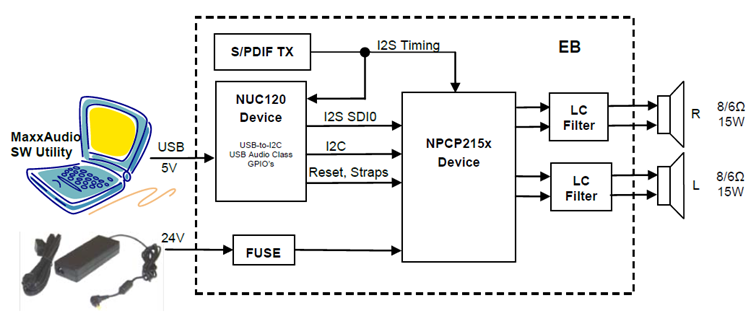
- Connect the two speakers to the speaker terminals.
- Plug the power adaptor brick output into the EB power jack and then into the wall socket.
- Connect the mini-USB cable between the PC USB Host and EB mini-USB connector.
- Run the MaxxDSP utility from the PC and contact Nuvoton FAE for detailed operation.
Resources
User Manual | NPCP215FA0YX | Software Development Tool | Driver (BSP) | Programmer | Nuvoton Official Forum | Nuvoton eStore
*Ordering Number : NT-NPCP215F