
FAQ
- M051 Base Series(95)
- M0518 Series(97)
- M0519 Series(43)
- M0564 Series(1)
- Mini51 Base Series(90)
- Nano100/102 Base Series(101)
- Nano103 Base Series(10)
- Nano110/112 LCD Series(100)
- Nano120 USB Series(111)
- Nano130 Advanced Series(110)
- NUC029 Series(94)
- NUC100/200 Advanced Series(102)
- NUC120/122/123/220 USB Series(116)
- NUC121/125 Series(1)
- NUC126 USB Series(2)
- NUC130/230 CAN Series(103)
- NUC131/NUC1311 CAN Series(98)
- NUC140/240 Connectivity Series(114)
- M451 Base Series(118)
- M451M Series(117)
- M452 USB Series(130)
- M4521 USB Series(1)
- M453 CAN Series(128)
- M463 CAN FD/USB HS Series(1)
- M467 Ethernet/Crypto Series(1)
- M471 Series(1)
- M479 Motor Control Series(1)
- M481 Base Series(4)
- M482 USB FS OTG Series(4)
- M483 CAN Series(4)
- M484 USB HS OTG Series(4)
- M485 Crypto Series(4)
- M487 Ethernet Series(4)
- M4TK Touch Key Series(25)
- NUC442/472 Series(130)
- NUC472 Series(1)
- NUC505 Series(138)
Products
Applications
Function
+
FAQ
How to enable DSP (Digital Signal Processing) function in the NuMicro® Cortex-M4 series? Issue Date:2016-08-18
The NuMicro® Cortex-M4 series BSP (Board Support Package) includes the Cortex®-M4 DSP library which is comprehensive and easy to use and develop directly. Besides, the calculation algorithms in the library have been optimized to effectively reduce the operation time.
-
To enable DSP with Keil:
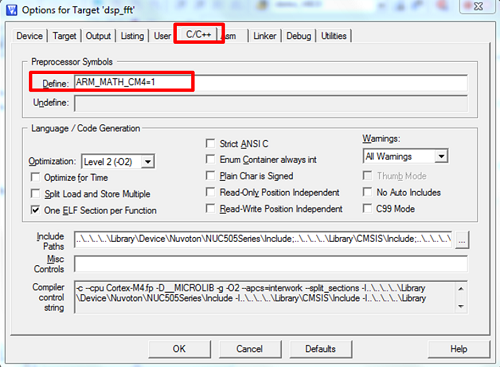
- After starting Keil, select Target Options, go to the C/C++ tab page, and enter “ARM_MATH_CM4=1” in the Define field.
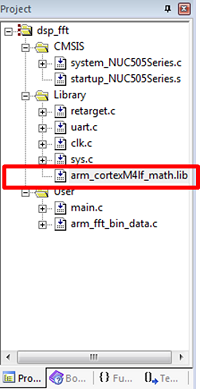
- Add “arm_cortexM4lf_math.lib” to the Library (\Library\CMSIS\Lib\ARM).
- Include the arm_math.h file to the main.c. After that, user can call the DSP library in the main.c.
-
To enable DSP with IAR:
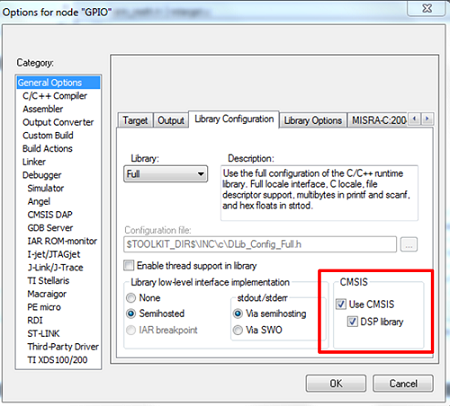
- After starting IAR, select Options, go to the General Options page, and enable the Use CMSIS and DSP library under the Library Configuration page.
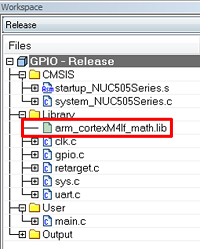
- Add “arm_cortexM4lf_math.lib” to the Library (\Library\CMSIS\Lib\ARM).
- Include the arm_math.h file to the main.c. After that, user can call the DSP library in the main.c.
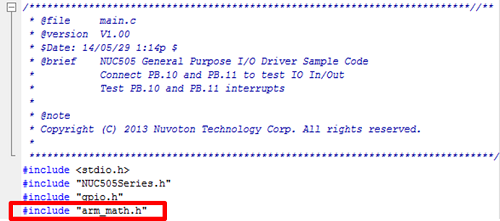
Note: arm_cortexM4lf_math.lib includes the Cortex®-M4 DSP library.
| Products: | Microcontrollers ,Arm Cortex-M4 MCUs ,M451 Base Series ,M451M Series ,M452 USB Series ,M453 CAN Series ,M4TK Touch Key Series ,NUC442/472 Series ,NUC505 Series |
|---|---|
| Applications: | |
| Function: | Peripherals,ARM,DSP,Software and Tools,Development-Environment,BSP Software Library,IAR,Keil |