
FAQ
- M051 Base Series(95)
- M0518 Series(97)
- M0519 Series(43)
- M0564 Series(1)
- Mini51 Base Series(90)
- Nano100/102 Base Series(101)
- Nano103 Base Series(10)
- Nano110/112 LCD Series(100)
- Nano120 USB Series(111)
- Nano130 Advanced Series(110)
- NUC029 Series(94)
- NUC100/200 Advanced Series(102)
- NUC120/122/123/220 USB Series(116)
- NUC121/125 Series(1)
- NUC126 USB Series(2)
- NUC130/230 CAN Series(103)
- NUC131/NUC1311 CAN Series(98)
- NUC140/240 Connectivity Series(114)
- M451 Base Series(118)
- M451M Series(117)
- M452 USB Series(130)
- M4521 USB Series(1)
- M453 CAN Series(128)
- M463 CAN FD/USB HS Series(1)
- M467 Ethernet/Crypto Series(1)
- M471 Series(1)
- M479 Motor Control Series(1)
- M481 Base Series(4)
- M482 USB FS OTG Series(4)
- M483 CAN Series(4)
- M484 USB HS OTG Series(4)
- M485 Crypto Series(4)
- M487 Ethernet Series(4)
- M4TK Touch Key Series(25)
- NUC442/472 Series(130)
- NUC472 Series(1)
- NUC505 Series(138)
FAQ
How to set the Power-On-Setting of EVB board? Issue Date:2025-01-20
Platform: MA35D1
Platform resource link: https://www.nuvoton.com/products/microprocessors/arm-cortex-a35-mpus/ma35d1-high-performance-edge-iiot-series/
BSP link: https://github.com/OpenNuvoton/MA35D1_NuWriter
Configure Power-on Setting:
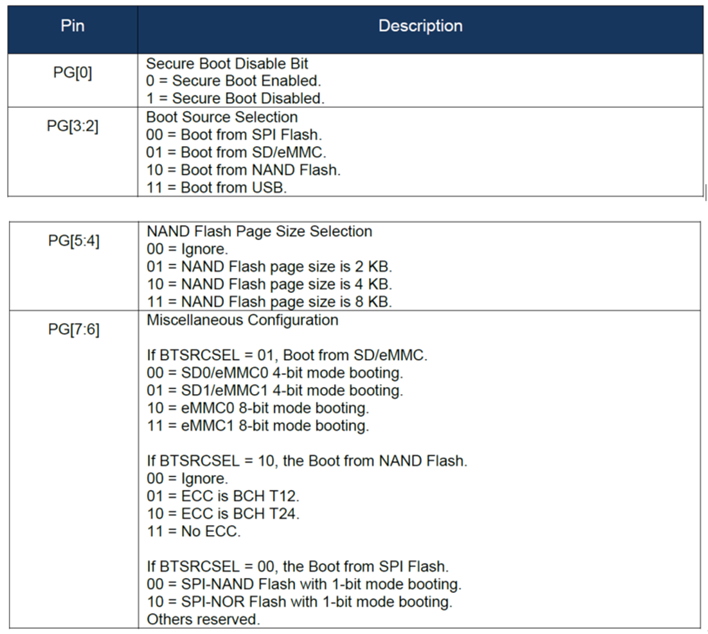
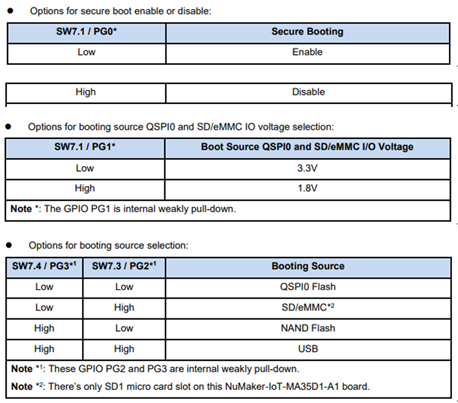
Make sure the power-on setting for the booting source selection on the DIP Switch (SW7)
followed the correct ON/OFF states shown in Table.
(Refer to User Manual : https://www.nuvoton.com/products/microprocessors/arm-cortex-a35-mpus/ma35d1-high-performance-edge-iiot-series/?group=Document&rt=User%20Manual&tab=2)
After choosing the correct power-on setting on these DIP switches, the evaluation environment will boot
from the image stored when power is supplied to the EVB board.
NuMaker-HMI-MA35D1-S1
NuMaker-IoT-MA35D1-A1
| Products: | Microprocessors ,Arm Cortex-A35 MPUs ,MA35D1 High-Performance Edge IIoT Series |
|---|---|
| Applications: | |
| Function: | Others,Boot source,Power-On-Setting |