
FAQ
- M051 Base Series(95)
- M0518 Series(97)
- M0519 Series(43)
- M0564 Series(1)
- Mini51 Base Series(90)
- Nano100/102 Base Series(101)
- Nano103 Base Series(10)
- Nano110/112 LCD Series(100)
- Nano120 USB Series(111)
- Nano130 Advanced Series(110)
- NUC029 Series(94)
- NUC100/200 Advanced Series(102)
- NUC120/122/123/220 USB Series(116)
- NUC121/125 Series(1)
- NUC126 USB Series(2)
- NUC130/230 CAN Series(103)
- NUC131/NUC1311 CAN Series(98)
- NUC140/240 Connectivity Series(114)
- M451 Base Series(118)
- M451M Series(117)
- M452 USB Series(130)
- M4521 USB Series(1)
- M453 CAN Series(128)
- M463 CAN FD/USB HS Series(1)
- M467 Ethernet/Crypto Series(1)
- M471 Series(1)
- M479 Motor Control Series(1)
- M481 Base Series(4)
- M482 USB FS OTG Series(4)
- M483 CAN Series(4)
- M484 USB HS OTG Series(4)
- M485 Crypto Series(4)
- M487 Ethernet Series(4)
- M4TK Touch Key Series(25)
- NUC442/472 Series(130)
- NUC472 Series(1)
- NUC505 Series(138)
Products
Applications
Function
+
FAQ
Build GStreamer by Buildroot Issue Date:2025-03-07
The default configuration of an Image built by Buildroot is minimalistic, which means you need to manually enable the libraries you need to use. If you want to use Gstreamer-related libraries, you can follow the steps below to build them.
There are many options that can be enabled or disabled. You should choose what you need and disable others to decrease your image size. If you don’t know which ones should be enabled, you can refer to the Link.
$ make menuconfig
Target Package ---> |
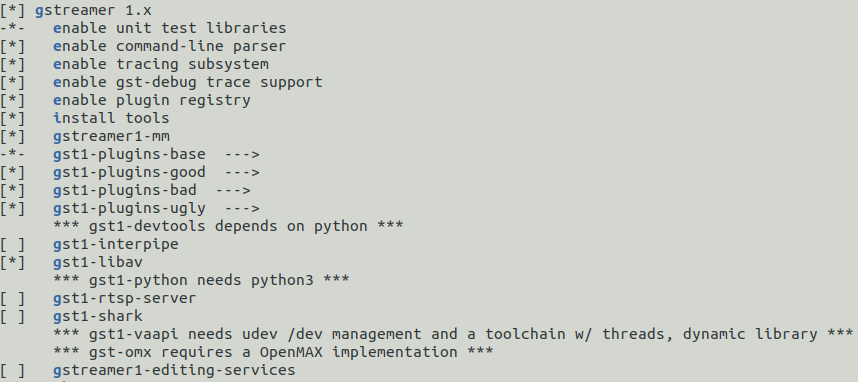
After enabling these libraries, rebuild the package and re-pack it. Usually, you just need to execute the 'make' command. Sometimes, the libraries are not built into the image. In such cases, you can enter the following command to force the package to rebuild.
$ make gst1-plugins-base-rebuild && make |
| Products: | Microprocessors ,Arm Cortex-A35 MPUs |
|---|---|
| Applications: | |
| Function: | Others,Buildroot,GStreamer,Qt 5 |